
Migraine Tally: Headache Diary
A private migraine diary for your phone and watch
Log a migraine or headache in one tap, even in the dark. Fill in the details later. Look back over your weeks and months. No account, no ads, no tracking.
 Coming soon to the App Store

Free to start · No account · Nothing leaves your device unless you send it
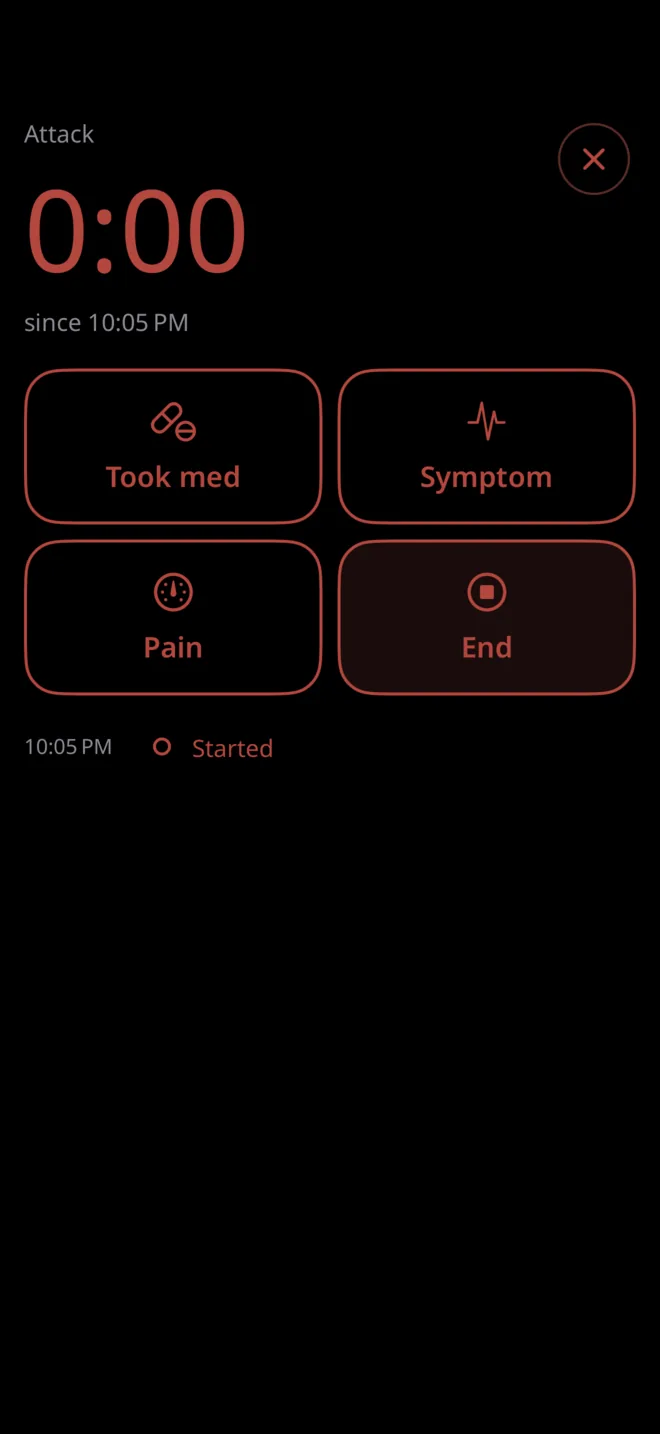

Log a migraine in one tap, even in the dark
When a migraine starts, you don't want a bright screen or a long form. Tap Start attack and the timer runs. Attack mode is true black with dim red text and big buttons: pain, medicine, symptoms, end. Every tap is time-stamped, so your headache log builds itself.
- One tap to start, from the app, a widget, your watch or a shortcut.
- Black and dim red, with large buttons you can hit with your eyes half closed.
- Every entry is time-stamped. Nothing else is required.

Start from your wrist, your lock screen or your home screen
Migraine Tally is there wherever you reach first.
On Android and Wear OS
- Wear OS app, tile and watch face complication.
- Home screen widget and a Quick Settings tile.
- The watch works without your phone nearby and catches up when it's back.


On iPhone and Apple Watch
- Apple Watch app and watch face complication.
- Widgets, a Lock Screen Live Activity, a Control Center button and Siri.
- The watch keeps its own copy, so it works when your iPhone is away.

Every attack, step by step. Fill in the rest tomorrow.
Your migraine journal keeps each attack as a simple timeline: when it started, how strong the pain was, what you took, symptoms, aura and when it ended. Missed something? Add it the next day, in under a minute.

Your month at a glance
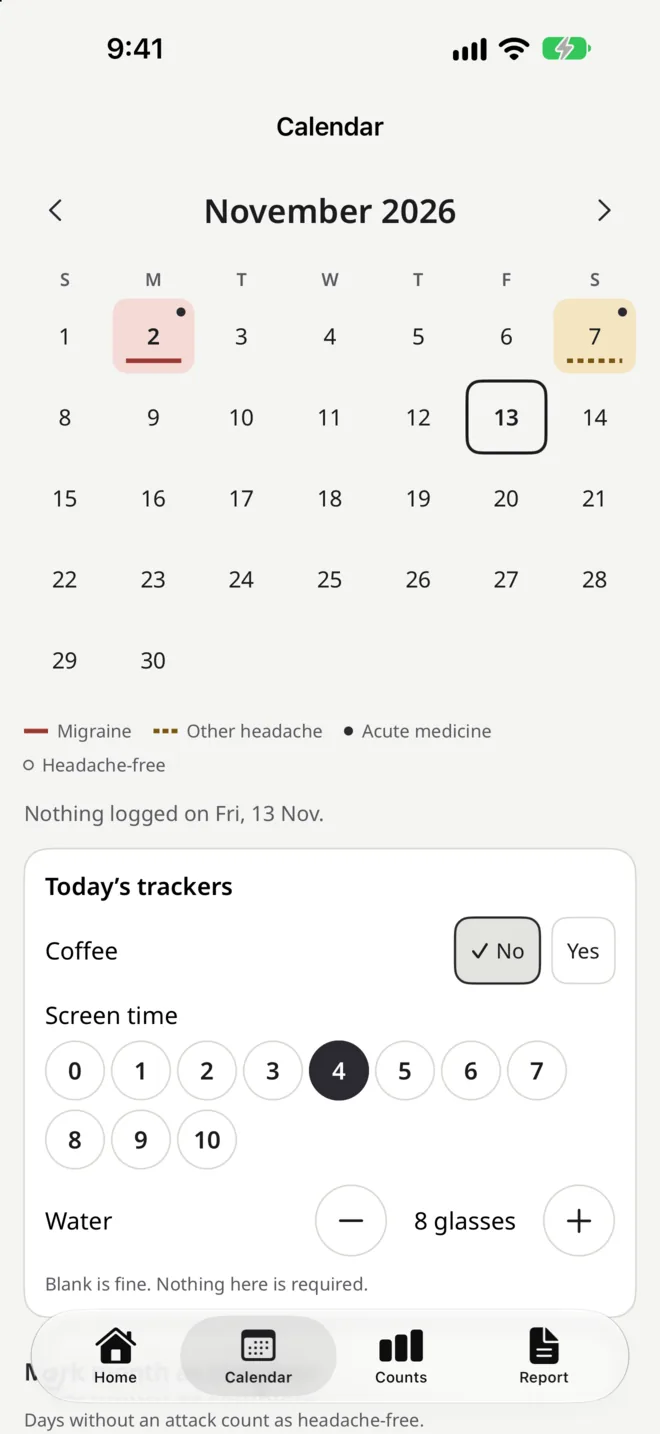
A paper-style migraine calendar shows migraine days and other headache days, each marked its own way. The marks also work in black and white. See your monthly totals of headache days and migraine days, just as you logged them.
- Calendar with clear marks for migraine days, other headache days and medicines.
- Monthly totals of headache days and migraine days.
- A timeline of every attack, in order.
- With Pro, your own daily trackers for things like coffee, water or screen time.
Pro
Spot possible triggers in your own diary
With Pro, Migraine Tally looks across your entries for simple patterns: weekday, time of day, triggers, symptoms and air pressure. Everything is labelled "linked, not proven", because a pattern in your diary is not a cause.
Sleep and cycle (optional): With your permission, it can read sleep and period dates from Apple Health on iPhone or Health Connect on Android, only to show these patterns. It never writes to them, never copies the records into your diary, and nothing leaves your device.

No account. No cloud. No ads.
Your headache diary belongs to you. There's no sign-in, no Glintside server and nothing for us to see. Your entries stay on your phone and watch until you choose to export or back them up.
- No account to create.
- No ads, no analytics, no tracking.
- Stored only on your devices. Your phone and watch talk to each other directly.
- Export a CSV file or an encrypted backup whenever you like.
- Optional app lock with fingerprint, Face ID or Touch ID.

One diary for your phone, tablet and watch
- Android phones, tablets and foldables
- Wear OS watches
- iPhone and iPad
- Apple Watch
Available in 18 languages. Backups made on Android open on iPhone, and the other way round.

Free to use. Pro is one payment, no subscription.
Free
- Logging on phone, tablet and watch
- Attack timeline and calendar
- Monthly totals
- CSV export and encrypted backup
- App lock
- Reminders you choose (all off by default)
- Themes and app icons
Pro, one-time purchase
- Print or save your diary as a PDF: any month, 3, 6 or 12 months, or all time
- Year view, compare two periods, 12-month and all-time totals
- Patterns: weekday, time of day, triggers, symptoms, sleep and cycle, and air pressure
- Custom trackers
- Extra watch tile and complication styles
- On iPhone: a weekly encrypted backup to your own iCloud Drive
Pro is a single in-app purchase (US$12.99; local prices vary by country). Buy once and keep it.
Frequently asked questions
Is Migraine Tally free?
Yes. Logging, the calendar, the attack timeline, monthly totals, CSV export and encrypted backup are free. Pro adds PDF exports, the year view, patterns and more for a single one-time payment. There is no subscription.
Do I need an account?
No. There is no sign-up and no sign-in. Open the app and start logging.
Where is my diary stored?
Only on your own devices. Glintside has no server for your diary and never sees it. Your phone and watch sync directly with each other.
Does the watch app work without my phone?
Yes. On Wear OS and Apple Watch you can start and end an attack, add pain, medicine and symptoms with your phone away. It catches up when they’re back together.
Does it work with Apple Health or Health Connect?
Yes, optionally. With your permission, Pro patterns can read sleep and period dates from Apple Health (iPhone) or Health Connect (Android). It is read only and nothing leaves your device.
Can I export my migraine diary?
Yes. Export a CSV file or an encrypted backup at any time, for free. With Pro you can also print or save your diary as a PDF.
Can I move from Android to iPhone?
Yes. Make an encrypted backup on one and restore it on the other. The backup format is the same on both.
Does it need the internet?
No. Migraine Tally works fully offline.
Is Migraine Tally a medical app?
No. It’s a personal diary for writing down your headaches and migraines. It does not diagnose, predict or treat any condition, and it does not give medical advice.
Which languages does it support?
18 languages, including English, Spanish, German, French, Hindi, Tamil, Arabic, Japanese and Korean.
Help and support
Questions, ideas or a problem? Email hello@glintside.com. Tell us your device and the app version and we'll get back to you.
Restore Pro: Pro is tied to your Google Play or Apple account. If you reinstall or get a new phone, open the Pro screen from Settings and tap Restore purchase.

Start your migraine diary today
Free to download. No account. Your diary stays with you.
Coming soon to the App StoreMigraine Tally is a personal diary. It does not diagnose, predict or treat any condition and does not give medical advice.