SOP template · clinics and practices
Front desk SOP template: book a follow-up appointment
A real step-by-step SOP for new receptionists, recorded with Dewtrail in seven steps. Every patient name, ID, phone number and email was blurred before its screenshot was taken, so the guide is safe to print, pin up or hand to a temp.
Download the SOP (PDF)Record your own with Dewtrail
About this SOP
- Who it’s for
- Front desk and reception staff at a GP surgery, dental office, physio or therapy practice
- Task
- Book a follow-up visit from the patient record and send a text reminder
- Steps
- 7, each with a screenshot
- Hidden
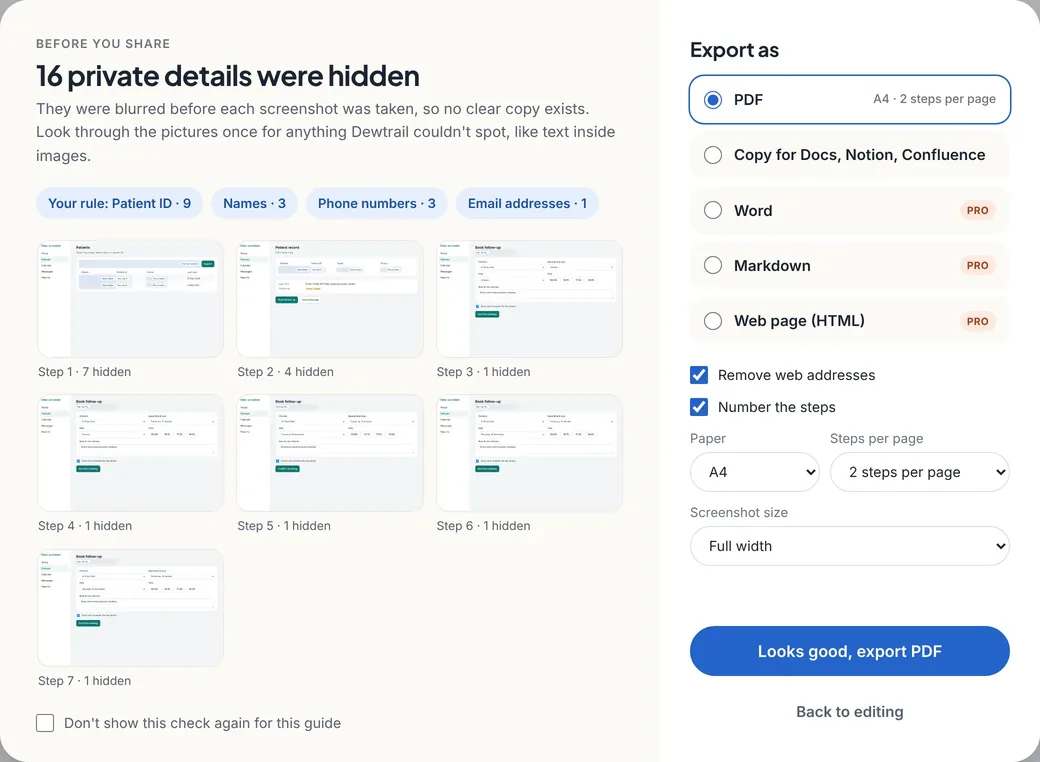
- 16 private details: 9 patient IDs (with a Patient ID rule), 3 names, 3 phone numbers and 1 email
Recorded on a made-up clinic scheduling system; the people, clients and numbers are invented. The title, introduction and tips were written in Dewtrail’s editor, and a few step titles were reworded. The screenshots, blurs and labels are exactly as Dewtrail saved them.
Book a follow-up appointment
For front-desk staff. Books a follow-up from the patient record and sends a text reminder. Takes about a minute.
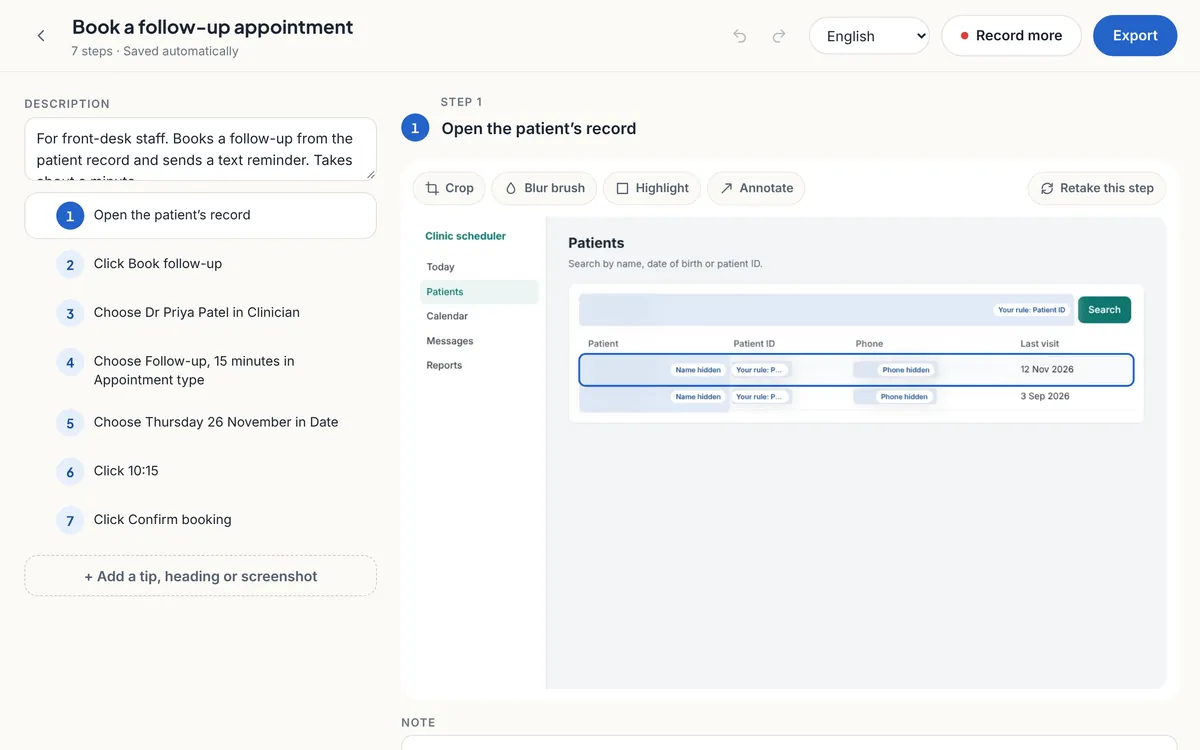
Open the patient’s record
Search by patient ID rather than name, so the right person comes up first.
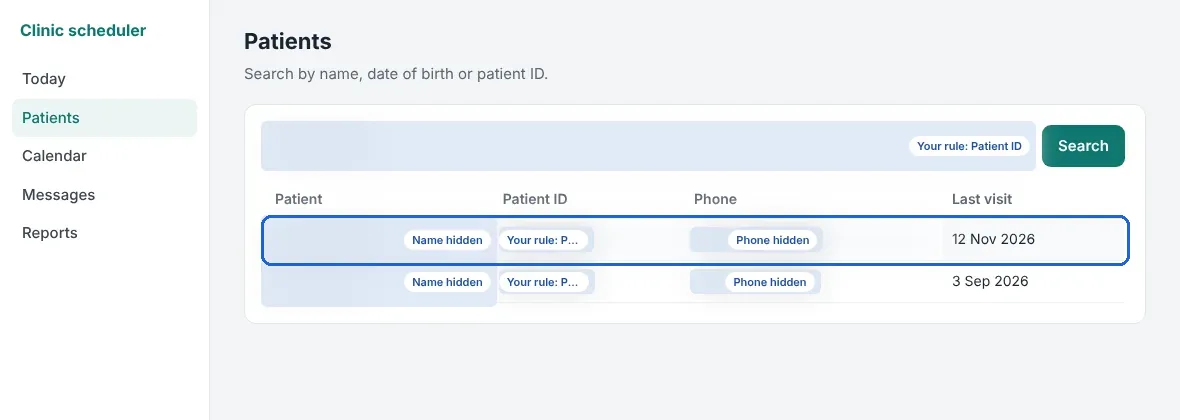
Click Book follow-up
Check the Follow-up line first: it says when the clinician wants to see the patient again.
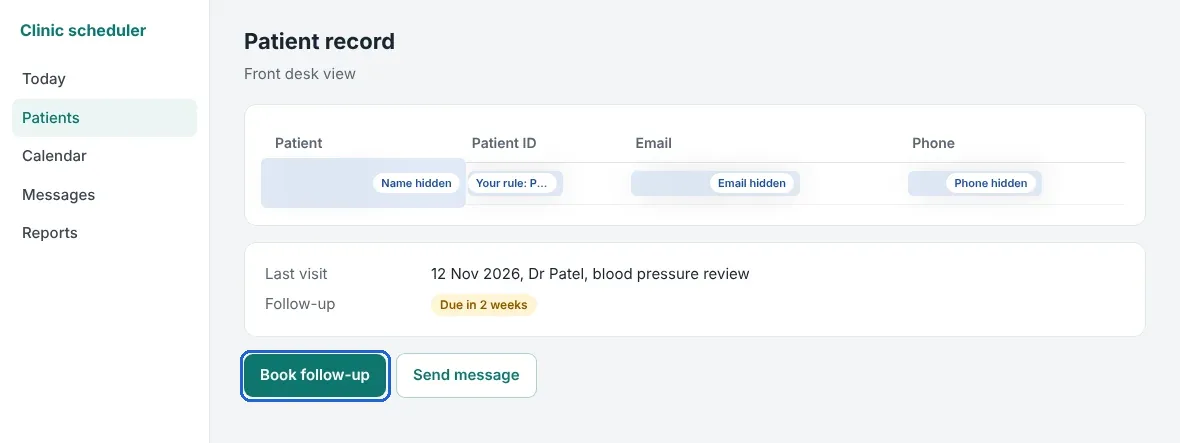
Choose Dr Priya Patel in Clinician
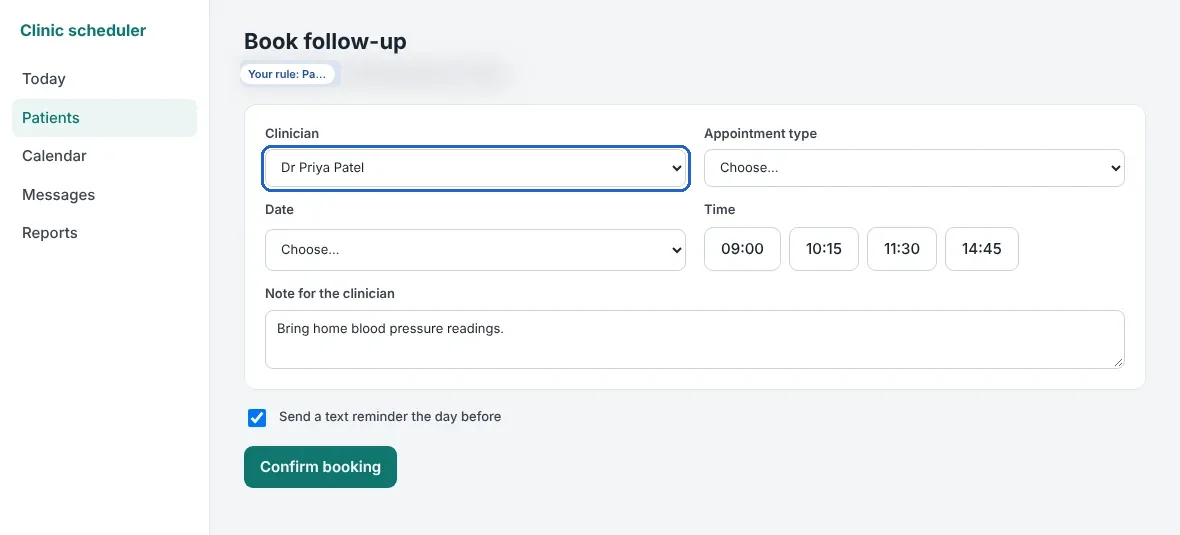
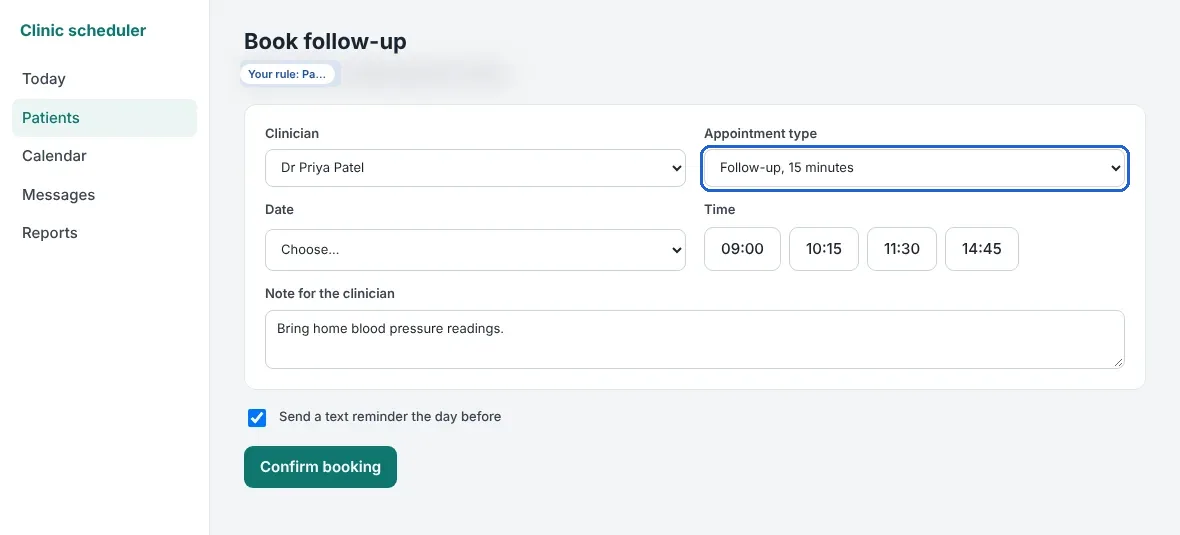
Choose Follow-up, 15 minutes in Appointment type
Choose 30 minutes only if the clinician asked for a longer review.
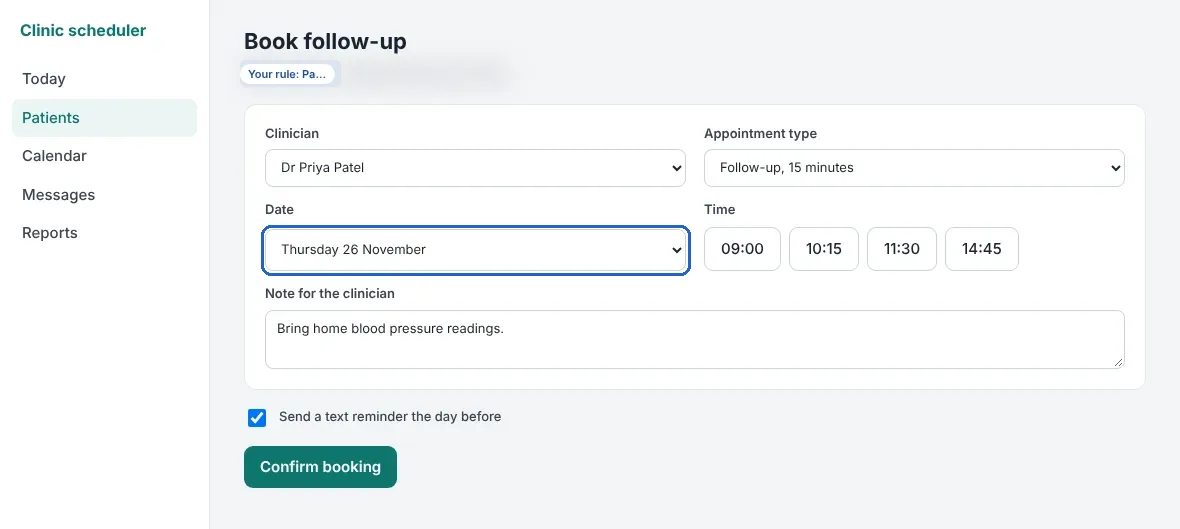
Choose Thursday 26 November in Date
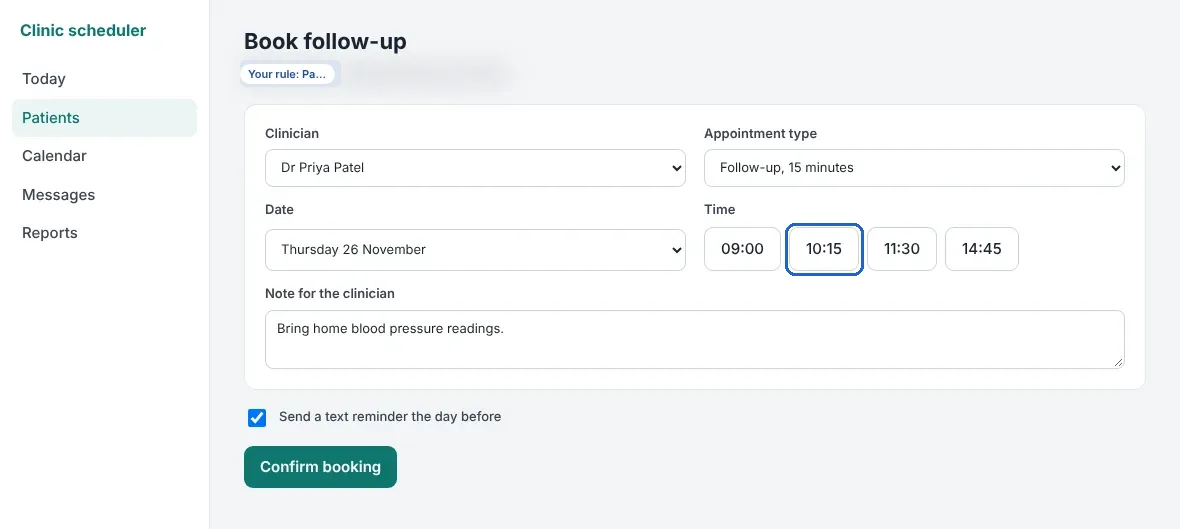
Click 10:15
Pick a time the patient said suits them. Grey times are already taken.
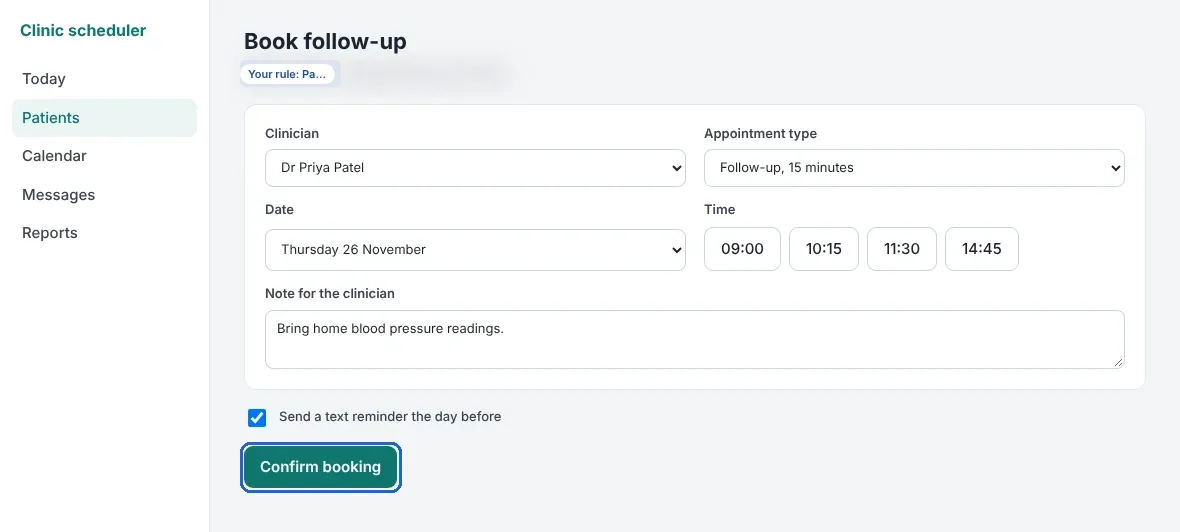
Click Confirm booking
Leave Send a text reminder the day before ticked unless the patient has opted out of texts.
Blur patient IDs, not just names
Dewtrail hides names in name and patient columns, emails, phone and card numbers on its own. Patient numbers differ in every system, so this SOP used a Patient ID rule (the pattern MRN- followed by six digits). Rules are part of Pro, and Team can share one rule file so every receptionist blurs the same things.
Before every export, the privacy check counts what was hidden, of which kind and in which step, so you can see the guide is safe to share.
Make your own SOP in a few minutes
A template only goes so far: your screens and your rules are different. Dewtrail is a steps recorder for Chrome, so the quickest SOP is the one you record while doing the task.
Record
Click the Dewtrail button or press Alt+Shift+R, then do the task once. Each click becomes a step with a written title and a screenshot. What you type is never stored.
Blur before capture
Private details are covered on the page before each screenshot, and each blur says what it hides. Nothing unblurred is ever saved.
Tidy and share
Reword titles, add tips, then export a PDF or copy the guide into Google Docs, Notion or Confluence. With Pro, keep it as a template and start new guides from it.
Coming soon to the Chrome Web StoreSee how Dewtrail worksWatch the 40-second video
More front desk SOPs worth recording
- Register a new patient and check their contact details
- Reschedule or cancel an appointment and offer the slot to the waiting list
- Check a patient in on arrival
- Send a prescription request to the right clinician
- Take a payment or record an insurance claim
- Run the end-of-day list and confirm tomorrow’s reminders
- Reset a colleague’s password in the practice system (for the practice manager)
Questions
Does this make our SOPs HIPAA or GDPR compliant?
No tool can promise that on its own. Dewtrail helps you avoid putting patient details into guides: private details are covered before each screenshot, and nothing is uploaded. Whether a guide may be shared is still your practice’s decision, so look through each guide before you share it.
Are patient screens sent anywhere?
No. Dewtrail has no account and makes no network requests. Screenshots and guides stay in Chrome on your computer, and exports are made there too.
What if Dewtrail can’t check part of a page?
Then it saves that step without a screenshot, rather than risk a clear copy. You can retake the step or add a note instead.
Free to record, $39 once for Pro
Free has unlimited guides, blur before capture, the privacy check and PDF export. Pro adds your own blur rules, your logo, Word and Markdown exports, annotations and templates. Team is $129 once for five people. No subscription. Compare plans